
Mini karaoke setup: pairing, vocal reduce and TF cards
A five-minute walk through the first switch-on: charging, mic pairing, Bluetooth, the vocal-reduce key and playing from a TF card.
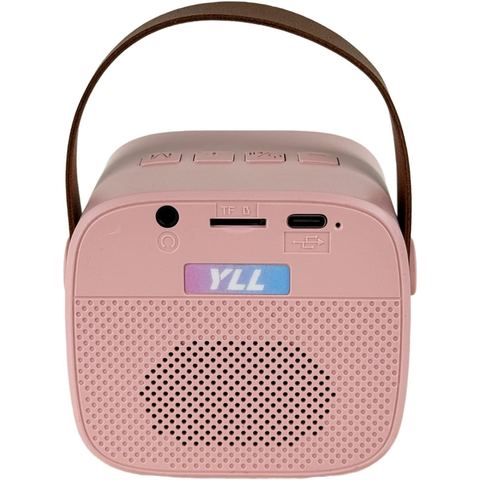
YLL Portable Karaoke Speaker, Light Pink with Wireless Mic
A soft pink speaker with one slim wireless mic, sized for toddler hands and solo shows.
4.7
$39.99
Colours and details
The short version
- Charge speaker and mics fully before the first show
- Speaker on first, then the mics
- Pair your phone once; it reconnects by itself
- Vocal reduce works best on studio pop tracks
Charge first
Use the supplied cables to charge the speaker and the mics. A full charge takes around two to three hours, and starting full avoids a flat battery halfway through the first chorus.
Pair the microphones
Switch the speaker on, then each microphone. They link automatically within a few seconds. If one does not, switch it off and on again close to the speaker.
Connect a phone or tablet
Open Bluetooth on your device and choose the YLL speaker. This is the only time you need to do it; from then on, the speaker reconnects automatically when both are on.
Use the vocal-reduce key
Play a song, then press the vocal key on the speaker. The original singer drops back so your child carries the melody. It works best on clean studio recordings and less well on live tracks.
Play from a TF card
Load MP3 songs onto a TF card, slide it into the back of the speaker and press play. No phone needed, which is handy for road trips and sleepovers.
Two more to consider

2 mics · Cloud White
YLL Mini Karaoke Machine, Cloud White with 2 Mics
4.611,125 ratings
$28.49

2 mics · Cream
YLL Mini Karaoke Machine, Cream with 2 Mics
4.611,125 ratings
$26.99$29.99